

Axanto Service Designer maps your IT services onto your monitoring, keeps their status current, and turns relevant alerts into correctly routed tickets.
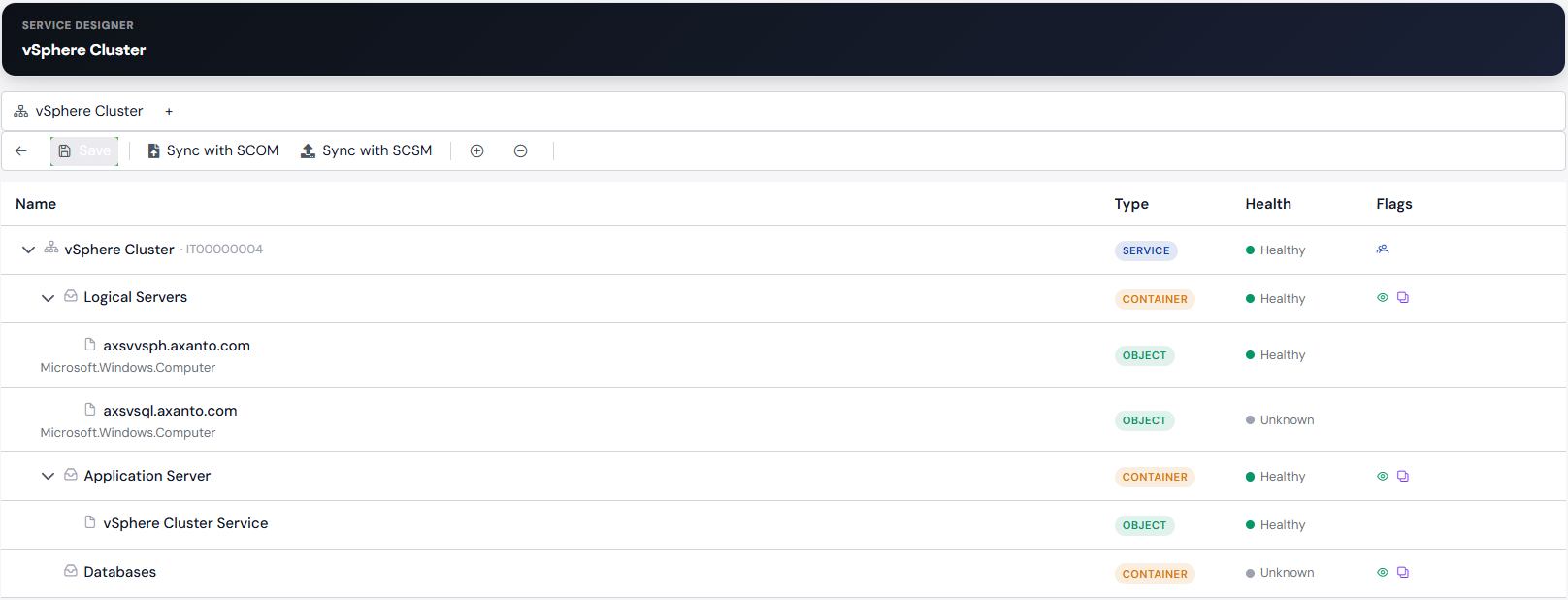
Service Designer represents the services your IT delivers as a service tree — with groups, entities and monitored objects — and synchronizes it with SCOM and SCSM, so health states stay current with monitoring. Alert rules match incoming alerts by name, severity and priority, and create tickets against the right service offering. Repeated alerts are detected, known noise can be suppressed without disabling the underlying monitoring alert, and tickets close automatically once their alert is resolved.
Your benefits:
• Service tree of groups, entities and monitored objects, synchronized with SCOM and SCSM
• Alert rules by name, severity and priority create tickets against the right service offering
• Duplicate detection and noise suppression, without disabling the underlying monitoring alert
• Tickets close automatically once their alert is resolved
Who is it for?
For IT operations teams that monitor with SCOM but need to think about outages in terms of services rather than individual servers – and do not want every alert to become a ticket of its own.
How it fits in
Service Designer is a module of the Axanto Portal. It models your services as a tree of the objects monitored in SCOM, takes over their health state and turns relevant alerts into tickets for the matching service offering. Maintenance windows can be set in SCOM or Icinga from the portal. Everything runs in your own infrastructure.
Requirements:
• Axanto Portal with a licence for the Service Designer module
• System Center Operations Manager
• Optional: Service Manager for service synchronisation
Interested? Request a demo